
Formly
Formly lets you create, publish, and analyze forms using AI chat or a visual editor to quickly collect the answers you need.
Visit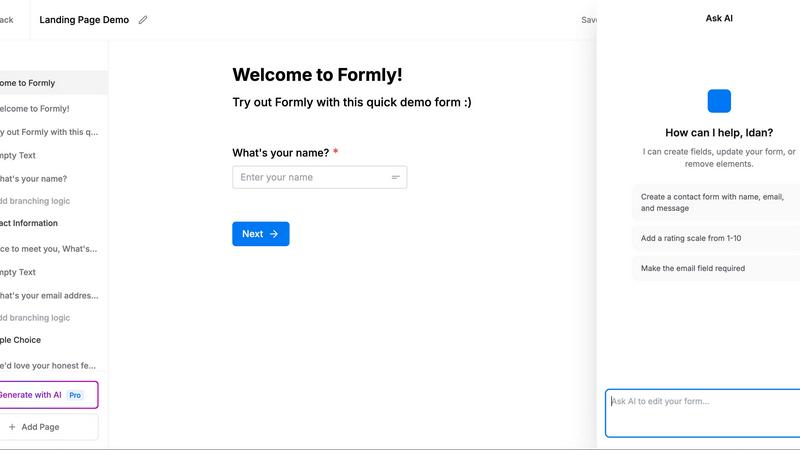
About Formly
Formly is a modern form-building platform designed to eliminate the friction of starting from scratch. Instead of staring at a blank template, teams can describe the outcome they want in natural language using popular AI agents like Claude, ChatGPT, Cursor, Codex, or OpenClaw. Formly then generates a polished, high-converting form tailored to that goal, complete with relevant questions, field types, and page flows. Once generated, every form opens in a full visual editor where users can fine-tune every detail, from drag-and-drop blocks and multi-page flows to conditional logic, answer piping, and custom branding. The platform supports a wide range of field types, including text inputs, signatures, ratings, file uploads, dropdowns, matrices, phone, email, and more. Beyond creation, Formly provides robust analytics, submission management, webhooks, email notifications, and GDPR-compliant hosting in Europe. It is built for teams that need answers, not just forms, whether they are screening job applicants, collecting customer feedback, managing event signups, or qualifying leads. The core value proposition is speed, flexibility, and data ownership, enabling users to go from idea to live form in seconds while keeping their data secure and under their control.
Features of Formly
AI-Powered Form Generation with Any Agent
Formly integrates seamlessly with leading AI agents, including Claude, ChatGPT, Cursor, Codex, and OpenClaw. After a one-time connection setup, users can simply ask their agent to create a form by describing the desired outcome, such as "Build a job application form with a resume upload" or "Create a feedback survey for our beta users." The agent interprets the request, selects appropriate questions, field types, and page flow, and publishes the form in seconds. This feature dramatically reduces form creation time and ensures that every form is optimized for the specific goal, without requiring users to manually design or structure their questions.
Full Visual Editor for Complete Control
Every form generated by AI opens in a comprehensive visual editor, not a locked template. This editor gives users complete freedom to modify any element, from field labels and validation rules to page layout and styling. The drag-and-drop interface allows for effortless rearrangement of blocks, while real-time preview shows exactly how the form will appear to respondents. Advanced editing capabilities include multi-page flows, conditional logic that shows or hides fields based on previous answers, answer piping to personalize follow-up questions, and custom branding with logos, colors, and fonts. Users can start from scratch or refine what the agent built, ensuring the final form matches their exact requirements.
Comprehensive Field Types and Logic
Formly supports an extensive library of field types to accommodate virtually any data collection need. Standard inputs like text, email, phone, and dropdowns are complemented by specialized fields such as file uploads (for resumes, images, or documents), electronic signatures, rating scales, matrices, and date pickers. The real power lies in the platform's logic capabilities. Conditional logic allows forms to adapt dynamically based on respondent answers, showing relevant questions and hiding irrelevant ones. Answer piping lets you personalize subsequent questions by referencing earlier responses, such as "Hey @First Name, can we send updates to @Email?" Multi-page forms break longer surveys into digestible steps, improving completion rates and user experience.
Analytics, Submissions, and Integrations
Formly provides a robust backend for managing form data and understanding respondent behavior. The analytics dashboard displays key metrics like total submissions, completion rates, and average ratings, with visual breakdowns of response distributions. Users can view individual submissions, filter by date or answer criteria, and export data as needed. For real-time data flow, webhooks push every submission to any service that accepts them the moment they arrive, enabling integration with CRMs, databases, or custom workflows. A REST API and MCP support allow developers and AI agents to pull responses programmatically. Email notifications keep teams informed of new submissions, while upcoming integrations with Notion, Zapier, and Make will further extend automation capabilities.
Use Cases of Formly
Applicant Screening and Job Applications
Human resources teams and hiring managers can use Formly to streamline their applicant screening process. By simply describing the role and requirements to an AI agent, they can generate a comprehensive job application form that includes resume upload fields, skills assessments, and custom questions. Conditional logic can show different questions based on the applicant's experience level or role preference. Multi-page flows break the application into manageable sections, such as personal details, work history, and skills evaluation. Submissions are instantly available in the dashboard and can be piped via webhook to an ATS or CRM, ensuring no candidate is missed and the entire process remains efficient and organized.
Customer Feedback and Market Research
Product teams and marketers can leverage Formly to collect actionable feedback from users, beta testers, or customers. An AI agent can generate a feedback survey tailored to specific goals, such as measuring Net Promoter Score (NPS), identifying feature requests, or understanding pain points. The visual editor allows for fine-tuning questions, adding rating scales, and incorporating conditional logic to probe deeper based on initial answers. Analytics provide instant visibility into response trends, such as "72% of users request dark mode," enabling data-driven decisions. Webhooks can send feedback directly to product management tools or databases, closing the loop between data collection and action.
Lead Qualification and Event Signups
Sales and marketing teams can use Formly to capture and qualify leads directly from their website or social media channels. A generated form can include fields for contact information, company size, budget range, and specific needs, with conditional logic routing high-potential leads to a different thank-you page or notification. The embed feature allows forms to be placed seamlessly on existing pages, while short links make them easy to share in emails or posts. Submissions flow into the CRM via webhook or API, enabling immediate follow-up. For event signups, Formly can handle attendee details, dietary preferences, session selections, and even payment or confirmation steps.
Internal Surveys and Data Collection
Organizations can use Formly for internal purposes such as employee engagement surveys, IT support requests, or project intake forms. The AI generation capability allows managers to quickly create polls or feedback forms without needing design skills. Conditional logic ensures that employees only see relevant questions, improving completion rates. Answer piping personalizes the experience, such as addressing the respondent by name or referencing their department. All data remains GDPR-compliant and hosted in Europe, meeting strict internal data governance policies. Webhooks can integrate with internal tools like Slack or HR systems, ensuring responses are acted upon promptly.
Frequently Asked Questions
How does Formly generate a form using an AI agent?
After a one-time setup that connects Formly to your preferred AI agent (Claude, ChatGPT, Cursor, Codex, or OpenClaw), you simply describe the outcome you want in natural language. For example, "Create a feedback survey for our beta users" or "Build a job application form with a resume upload." The agent interprets your request, selects appropriate questions, field types, and page flow, and generates a live form in seconds. You can then review and fine-tune the form in the visual editor before publishing.
Can I customize a form after it is generated by AI?
Yes, absolutely. Every form generated by AI opens in a full visual editor, not a locked template. You have complete control to modify any element, including adding or removing fields, changing field types, adjusting validation rules, reordering pages, applying conditional logic, and customizing branding with your logo and colors. The editor provides drag-and-drop functionality and real-time preview, so you can refine the form to match your exact requirements.
What types of fields and logic does Formly support?
Formly supports a comprehensive range of field types, including text inputs, email, phone numbers, dropdowns, checkboxes, radio buttons, file uploads, electronic signatures, rating scales, matrices, date pickers, and more. For logic, you can implement conditional logic to show or hide fields based on previous answers, answer piping to personalize subsequent questions with earlier responses, and multi-page flows to break long forms into focused steps. These capabilities allow you to create dynamic, user-friendly forms that adapt to each respondent.
Is Formly GDPR compliant and where is data hosted?
Yes, Formly is fully GDPR compliant. The platform is hosted in Europe, and Formly does not use cookies or track form responses. Your data remains yours, with strict privacy and security measures in place. This makes Formly suitable for organizations that need to comply with European data protection regulations, whether they are collecting customer data, employee information, or any other sensitive input.
Similar to Formly
Forms Plugin
The #1 Native Form Builder Plugin for Framer - No Code, No Embeds, No External Platforms.
No Code Website Builder
Skip the coding and launch professional websites or apps in days using our curated library of premium, vetted no-code templates.