
MacBrightness
MacBrightness unlocks your Mac’s hidden brightness range, doubling screen visibility in direct sunlight for just five dollars with no subscription.
Visit
About MacBrightness
MacBrightness is a utility application designed for MacBook Pro users and Pro Display XDR owners who need their screens to perform optimally in bright environments. The software unlocks a hidden brightness range that macOS typically reserves exclusively for HDR video content, making it available system-wide across all applications. This means your display can reach up to 1,600 nits of sustained brightness, nearly double the standard maximum allowed by the operating system. The product is built for professionals who work outdoors, near windows, or in brightly lit spaces where standard screen brightness becomes unreadable. Unlike hardware modifications or complex system tweaks, MacBrightness integrates seamlessly with your existing keyboard brightness keys, requiring no new shortcuts or menu bar navigation. The application has zero noticeable CPU overhead and uses no low-level system hacks, operating entirely within the supported capabilities of your display hardware. It is compatible with MacBook Pro 14-inch and 16-inch models featuring M-series Pro or Max chips, as well as the Pro Display XDR, all of which use mini-LED panels capable of sustaining high brightness levels. The software offers a free Splitscreen Mode trial that lights up half your screen to full brightness, allowing you to compare the difference side by side with the standard macOS brightness limit. A one-time purchase unlocks the full screen, with no subscription fees or recurring charges.
Features of MacBrightness
System-Wide Brightness Extension
MacBrightness extends your display brightness beyond the standard macOS limit across every application on your computer, not just HDR video content. This means that whether you are editing documents, browsing the web, coding, or using design software, the entire screen benefits from the full brightness range your display hardware supports. The feature works automatically once activated, with no need to configure per-application settings or remember special shortcuts.
Native Keyboard Integration
The application uses the same brightness keys (F1 and F2 on most Mac keyboards) that you already use for standard brightness control. There are no new keyboard shortcuts to learn, no menu bar icons to hunt for, and no additional controls to manage. You simply press the brightness up key past the old limit, and the screen continues to brighten, providing an intuitive and familiar user experience that requires zero adjustment time.
Zero Performance Overhead
MacBrightness operates with no noticeable CPU overhead and employs no low-level system hacks or kernel extensions. It simply opens the brightness range that your display already maintains internally for HDR content, making it available for general use. This means your MacBook Pro continues to run efficiently, with no impact on battery life, system responsiveness, or application performance during normal operation.
Free Splitscreen Trial Mode
The free trial version of MacBrightness activates Splitscreen Mode, where one half of your screen jumps to full brightness while the other half remains at the standard macOS brightness level. This side-by-side comparison allows you to see the exact difference the application makes before committing to a purchase. The Splitscreen Mode remains free indefinitely, giving you unlimited time to evaluate the product.
Use Cases of MacBrightness
Outdoor Mobile Work
Professionals who work from outdoor locations such as café patios, park benches, airport gates, or balconies often struggle with screen readability in direct sunlight. MacBrightness solves this by providing up to 1,600 nits of sustained brightness, making text, images, and interfaces clearly visible even under harsh lighting conditions. This allows users to maintain productivity without having to search for shaded spots or indoor alternatives.
Bright Office Environments
Employees working in offices with large windows, open floor plans, or glass-walled conference rooms frequently encounter glare and reflection issues that wash out their screens. MacBrightness provides the extra brightness needed to overcome ambient light, ensuring that presentations, spreadsheets, and collaborative documents remain readable without requiring users to adjust their seating position or close blinds.
Creative Professional Workflows
Photographers, video editors, graphic designers, and other creative professionals benefit from the extended brightness range when reviewing visual content in less-than-ideal lighting conditions. The system-wide application ensures that color grading, photo editing, and design work maintain visibility and accuracy, even when working near bright light sources or outdoors during client meetings.
Travel and Remote Work
Frequent travelers who work from airplanes, trains, coffee shops, co-working spaces, or hotel rooms with variable lighting conditions find MacBrightness invaluable. The ability to instantly boost brightness allows them to adapt to any environment without compromising screen readability. The one-time purchase model means no ongoing costs for professionals who rely on their MacBook Pro as their primary work machine.
Frequently Asked Questions
Does MacBrightness work on all Mac models?
MacBrightness is specifically designed for MacBook Pro 14-inch and 16-inch models with M-series Pro or Max chips, as well as the Pro Display XDR. These devices use mini-LED panels that can sustain approximately 1,600 nits of brightness. Other Mac models, including those with standard LCD or older display technology, do not have the hardware capability to support the extended brightness range and are not compatible with the application.
Will MacBrightness damage my display or reduce its lifespan?
No. MacBrightness only uses the HDR brightness range that your display already supports internally. The display hardware is designed to operate at these brightness levels without damage, and the application simply makes that range accessible for general use rather than restricting it to HDR video content. There is no risk of overheating or hardware degradation from using the full brightness range.
How do I try MacBrightness before buying?
MacBrightness offers a free Splitscreen Mode trial that requires no account creation or payment information. When you download and launch the application, it activates a side-by-side comparison where one half of your screen runs at full brightness while the other half remains at the standard macOS limit. This trial mode stays free indefinitely, allowing you to evaluate the difference in your own work environment before deciding to purchase.
Is there a subscription fee for MacBrightness?
No. MacBrightness uses a one-time purchase model with no recurring subscription fees. Once you purchase a license, you unlock the full-screen brightness feature permanently. There are no monthly or annual charges, no hidden fees, and no tiered pricing plans. The free Splitscreen Mode trial also remains available for as long as you want without any obligation to upgrade.
Pricing of MacBrightness
MacBrightness is available for a one-time purchase of $5. This single payment unlocks the full-screen brightness feature across all applications, providing permanent access to your display's extended brightness range. There are no subscription fees, no recurring charges, and no tiered pricing plans. The free Splitscreen Mode trial is available for unlimited use without any payment or account registration, allowing you to evaluate the product before purchasing. The license covers use on your personal MacBook Pro or Pro Display XDR with no additional costs for future updates within the same major version.
Explore more in this category:
Similar to MacBrightness
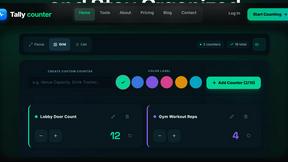
tallycounterweb.com
Tally Counter is a simple online counting tool for tracking attendance, workouts, inventory, sports scores, visitors, and everyday activities.

iHatePosting
Create once, tailor for each platform, and schedule posts across 14 social networks from one simple dashboard.

PDFWix
PDFWix is a free online PDF toolkit designed to make everyday PDF tasks simple, fast, and private.
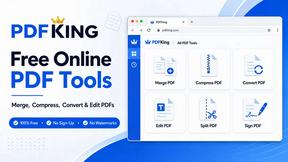
PDFKing
Free online PDF tools to merge, compress, convert, edit, sign, and manage documents—no signup, watermarks, or daily limits.



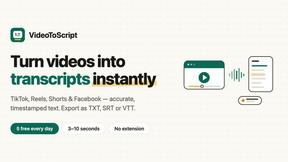
VideoToScript
Turn TikTok, Reels, Shorts, Facebook videos, audio, and video into accurate timestamped transcripts with TXT, SRT, and VTT exports.