LoadTester
LoadTester is a modern HTTP and API load testing tool that lets engineering teams run distributed performance checks from a browser or CI/CD pipeline.
Visit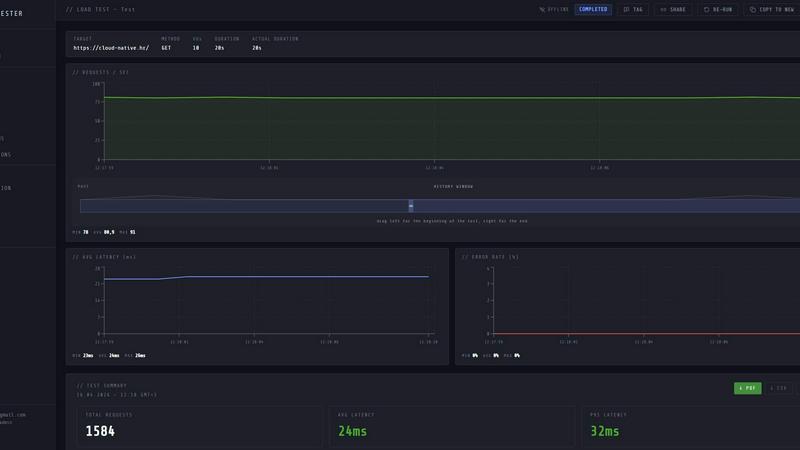
About LoadTester
LoadTester is a modern HTTP and API load testing tool built by Cloud Native d.o.o. for engineering teams that need repeatable performance checks without the overhead of managing infrastructure. It enables developers to create, launch, and monitor load tests directly from a browser or through CI/CD pipelines, with live analytics, p95 and error-rate thresholds, scheduled baselines, and run-to-run comparisons. The platform handles all the complex backend work, including worker scaling, infrastructure coordination, and execution flow, so teams can focus on interpreting results and improving application performance. LoadTester supports up to 10,000 virtual users and 10,000 requests per second per test, with cold start times under three seconds from test creation to first request. It is designed for teams that want simple, repeatable performance checks integrated into their development workflow. Key capabilities include distributed test execution, live streaming telemetry, smart auto-stop based on thresholds, and comprehensive automation through webhooks, Slack, email alerts, and API access. LoadTester also provides export options in PDF, CSV, or JSON formats, scheduled test runs, and detailed run comparisons to catch performance regressions before users notice. A free plan is available for teams to get started without any upfront commitment.
Features of LoadTester
Instant Execution and Distributed Workers
LoadTester eliminates the need for infrastructure setup by providing instant, distributed load test execution. Tests start in less than three seconds from cold start, with workers auto-scaling to handle the load. There is no queue time, no worker orchestration, and no scheduling headaches. The platform dispatches workers automatically, allowing teams to focus on results rather than managing the testing infrastructure. This feature is critical for teams that need fast feedback loops during development and deployment cycles.
Live Telemetry and Real-Time Analytics
While a test is running, LoadTester streams live analytics including requests per second, latency distributions (p50, p95, p99), active virtual users, and error rates. The live charts update continuously, showing throughput, latency, and errors during the run rather than waiting minutes after the test completes. This real-time visibility enables engineers to spot performance bottlenecks and anomalies as they happen, allowing for immediate adjustments or test termination if needed. The dashboard presents clear summaries of total requests, average latency, and data sent and received.
Smart Auto-Stop with Threshold Guardrails
LoadTester allows teams to set failure or latency thresholds that automatically stop tests when performance degrades beyond acceptable limits. Users can configure auto-stop conditions based on p95 latency, error rate percentage, or regression compared to a baseline run. When a threshold is breached, the test stops immediately, preventing wasted resources and alerting the team. Additional hooks can trigger notifications to Slack, email, or webhooks, and can post result links to release bots for automated CI/CD pipelines.
CI/CD Integration and Automation
LoadTester is designed for seamless integration into continuous integration and continuous deployment workflows. Teams can run tests on every deployment, schedule nightly release gates, and trigger tests via API access. The platform supports webhooks for completion events, Slack and email alerts for threshold breaches, and exportable results in PDF, CSV, or JSON formats. This automation ensures that performance testing becomes a repeatable, automated part of the development lifecycle, catching regressions before they reach production.
Use Cases of LoadTester
Pre-Release Performance Validation
Engineering teams can use LoadTester to validate application performance before launching new features or releases. By running spike tests on critical endpoints like checkout or authentication flows, teams can ensure that latency and error rates remain within service level objectives under expected load. The ability to compare runs against baselines helps catch regressions early, preventing performance issues from reaching users. This use case is essential for teams practicing continuous delivery and needing confidence in their application capacity.
CI/CD Pipeline Performance Gates
LoadTester integrates directly into CI/CD pipelines to act as a performance gate. Teams can configure automated tests that run on every pull request or deployment, with thresholds that fail the pipeline if latency or error rates exceed defined limits. The auto-stop feature and webhook notifications ensure that performance regressions block deployments automatically. This use case helps maintain consistent performance standards across releases without manual intervention, making performance testing a standard part of the development workflow.
Capacity Planning and Scalability Testing
Engineering and operations teams can use LoadTester to simulate high traffic volumes and understand how their applications scale. By running tests with up to 10,000 virtual users and 10,000 requests per second, teams can identify bottlenecks, determine optimal resource allocation, and validate infrastructure decisions. The live analytics and run-to-run comparisons provide data-driven insights for capacity planning, helping teams prepare for traffic spikes during product launches, marketing campaigns, or seasonal events.
Scheduled Baseline Monitoring
LoadTester supports scheduled test runs that act as continuous performance monitoring for production or staging environments. Teams can set up daily or hourly baseline tests that run automatically and compare results against historical data. When performance degrades beyond defined thresholds, alerts are sent via Slack, email, or webhooks. This use case is ideal for teams that want to detect performance regressions caused by code changes, infrastructure modifications, or third-party service dependencies before they impact end users.
Frequently Asked Questions
How does LoadTester handle infrastructure for load testing?
LoadTester manages all infrastructure automatically, including worker scaling, coordination, and execution flow. Users do not need to provision any servers, configure load generators, or manage distributed testing setups. The platform dispatches workers in less than three seconds from test creation, scales them to handle the specified load, and handles all backend orchestration. This allows teams to focus entirely on test scenarios and results rather than infrastructure management.
What types of tests can I run with LoadTester?
LoadTester supports HTTP and API load testing for GET, POST, PUT, and DELETE methods. Users can configure tests in either virtual user (VU) mode or requests per second (RPS) mode, with support for up to 10,000 VUs and 10,000 RPS per test. The platform is designed for endpoint-level testing, making it suitable for microservices, REST APIs, GraphQL endpoints, and web applications. Tests can be run ad-hoc, scheduled, or triggered via CI/CD pipelines.
Can I compare test results over time?
Yes, LoadTester provides run-to-run comparison capabilities that allow teams to track performance trends and detect regressions. Each test run generates a detailed result including total requests, latency distributions (p50, p95, p99), error rates, and throughput. Teams can compare current runs against historical baselines to identify performance changes. Regression thresholds can be configured to automatically trigger alerts or stop tests when performance degrades by a specified percentage compared to the baseline.
How does LoadTester integrate with CI/CD and team workflows?
LoadTester offers multiple integration options for team workflows. It provides API access for programmatic test creation and execution, webhooks for triggering actions on test completion, and direct notifications to Slack and email for threshold breaches. Tests can be scheduled to run at specific times or intervals, and results can be exported in PDF, CSV, or JSON formats for sharing with stakeholders. These integrations make LoadTester suitable for automated performance gates in CI/CD pipelines, release verification, and continuous monitoring.
Similar to LoadTester




xDevTools
1000+ versatile developer tools: format, encode, calculate, and convert. All in your browser.

JustLaunched
JustLaunched helps indie makers schedule product launches, reach active buyers, and distribute listings across curated SaaS directories.