
Caesura
Caesura is a macOS menu-bar app that reminds you to drink water, stretch, rest your eyes, and breathe on science-backed intervals.
VisitPublished on:
June 26, 2026
Pricing:
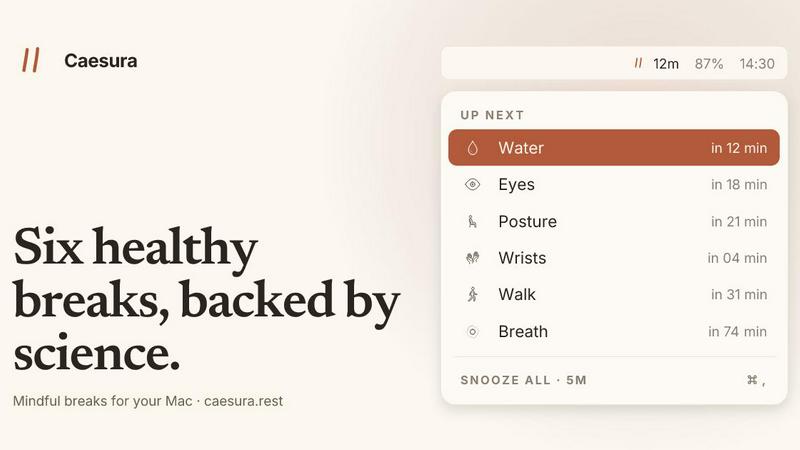
About Caesura
Caesura is a calm, focused macOS menu-bar break manager designed specifically for knowledge workers, developers, designers, and anyone who spends extended hours at a desk. Unlike traditional break reminders that rely on arbitrary intervals or intrusive pop-ups, Caesura is built on a foundation of scientific research. It manages six essential healthy habits: drinking water, walking, stretching your wrists, resting your eyes, checking your posture, and breathing. Each break operates on its own independent schedule, with intervals derived from peer-reviewed studies rather than round numbers. The application intelligently coalesces reminders that fall close together into a single, gentle break, ensuring you are never interrupted twice in a row. Caesura respects your workflow by automatically pausing during video calls, screen sharing, fullscreen applications, Do Not Disturb mode, and calendar events, then resuming exactly where it left off. It offers three distinct prompt styles per break, ranging from a full-screen overlay for habits you might ignore to a silent notification for lighter reminders. There are no accounts, no telemetry, and no subscriptions. Caesura is a one-time purchase for macOS 14 and later, with a free 14-day trial available. Its value proposition is simple: timely, evidence-based nudges that keep you healthy without breaking your focus or adding digital clutter.
Features of Caesura
Six Science-Backed Breaks
Caesura manages six distinct healthy habits: water (every 45 minutes), walking (every 60 minutes), wrists (every 30 minutes), eyes (every 20 minutes), posture (every 30 minutes), and breathing (every 90 minutes). Each interval is derived from specific peer-reviewed studies, not arbitrary round numbers. You can turn any break on or off individually and adjust its interval or display style to suit your preferences.
Coalescing Reminders
When two or more reminders come due within one minute of each other, Caesura intelligently merges them into a single, unified break prompt. This prevents the disruptive experience of being interrupted multiple times in quick succession. You receive one gentle nudge to address multiple habits, preserving your focus and flow while still ensuring you take the necessary breaks.
Automatic Context Awareness
Caesura respects your workflow by automatically pausing all timers when it detects you are busy. It watches for video calls, screen sharing, fullscreen applications, Do Not Disturb mode, calendar events, games, and FaceTime. When any of these are active, every timer freezes and resumes exactly where it left off. If you had 12 minutes until a water break, you still have 12 minutes after your call ends.
Three Customizable Prompt Styles
Each break can be assigned one of three distinct prompt styles. The Overlay takes over your screen until you press Return, ideal for breaks you might otherwise ignore. The Banner slides in from under the menu bar and auto-dismisses after 30 seconds for a gentle nudge. The Notification delivers a standard macOS notification for the lightest possible touch. You can choose a different style for each of the six breaks.
Use Cases of Caesura
Preventing Eye Strain During Long Coding Sessions
Software developers and data analysts who stare at screens for hours can set the eye break to a 20-minute interval. When triggered, a small cursor-following pill displays a 20-second countdown ring. You look away at something 20 feet distant, blink a few times, and the ring empties. This evidence-based practice reduces digital eye strain and dry eye symptoms without pulling you away from your work for more than a moment.
Maintaining Hydration During Back-to-Back Meetings
Professionals who spend their day in virtual meetings often forget to drink water. Caesura detects when you are on a call and pauses its water reminder, then prompts you the moment the call ends. With a 45-minute interval backed by hydration research, you receive a gentle overlay reminding you to drink a glass of water. This prevents the afternoon headaches and fatigue associated with mild dehydration.
Encouraging Movement in Sedentary Office Work
Remote workers and office employees who sit for prolonged periods benefit from the walking break every 60 minutes. When triggered, a banner suggests a two to five minute walk around the room, up the stairs, or outside. Research shows that walking breaks significantly reduce cardiovascular risks compared to standing alone. Caesura ensures you move regularly without requiring a gym membership or complex exercise routine.
Managing Wrist and Posture Health for Writers and Designers
Writers, graphic designers, and anyone who types extensively can set wrist and posture breaks to 30-minute intervals. The wrist break displays four illustrated stretches on the overlay, each lasting ten seconds. The posture break reminds you to shift into a new position rather than sit perfectly straight. Together, these breaks reduce the risk of repetitive strain injuries and chronic back pain that plague creative professionals.
Frequently Asked Questions
How does Caesura know when I am on a call?
Caesura monitors your system for active camera usage, screen sharing, fullscreen applications, Do Not Disturb mode, calendar events, and foreground FaceTime sessions. When any of these signals are detected, all timers automatically pause. They resume exactly where they left off once the activity ends. No manual intervention is required, and no audio or video data is recorded or transmitted.
Can I customize the intervals for each break?
Yes, absolutely. While each break comes with a default interval derived from scientific research, you can adjust the time for any break to suit your personal preference or schedule. You can also turn any break completely on or off. This flexibility allows you to tailor Caesura to your specific routine, whether you need more frequent water reminders or prefer longer intervals between walking breaks.
What happens if two reminders are due at the same time?
Caesura uses a coalescing feature to merge reminders that come due within one minute of each other. Instead of receiving two separate interruptions, you get one unified break prompt that covers both habits. For example, if your water and eye breaks are both due, you will see a single overlay reminding you to drink water and look away from the screen. This minimizes disruption to your workflow.
Is my data tracked or shared with anyone?
No. Caesura is a one-time purchase with no account creation, no telemetry, and no data collection. The application runs entirely locally on your Mac. It does not track your break history, analyze your behavior, or send any information to external servers. Your privacy is fully respected, and there is no subscription or recurring fee involved.
Pricing of Caesura
Caesura is available as a one-time purchase for $15. This single payment grants you lifetime access to the application with no recurring fees, no subscriptions, and no account required. A free 14-day trial is available so you can experience all features before committing to a purchase. The application requires macOS 14 or later and works exclusively on Mac computers. Your purchase covers all current and future updates within the same major version. No credit card is required to start the trial.
Similar to Caesura


Hop Hop Hop Dance AI
AI: 1–2 photos → 8s Hop Hop Hop squash-and-swap (pets OK).

Skull Cap Trend AI
AI: one selfie → 11s skull-cap glow-up (goofy → cold stare).
Basketball Middle Finger AI
Same dunk trend as Middle Finger Dunk AI (alt domain).

Middle Finger Dunk AI
AI: two photos → 12s middle-finger dunk 1v1 (playful).

Party Viral Dance AI
AI: one photo → 12s Iraqi party “viral dance” floor clip.

PokeBonk Game
Free browser PokeBonk — 3D Pokémon survivors-like (not video AI).
Dime Dime Baby AI
AI: one photo → 9s quinceañera “Dime Dime Baby” dance.