
Clean Image AI-Powered Photo Cleanup
Clean Image is a private AI photo cleanup tool that removes text, logos, and blemishes locally in your browser with no data uploads.
Visit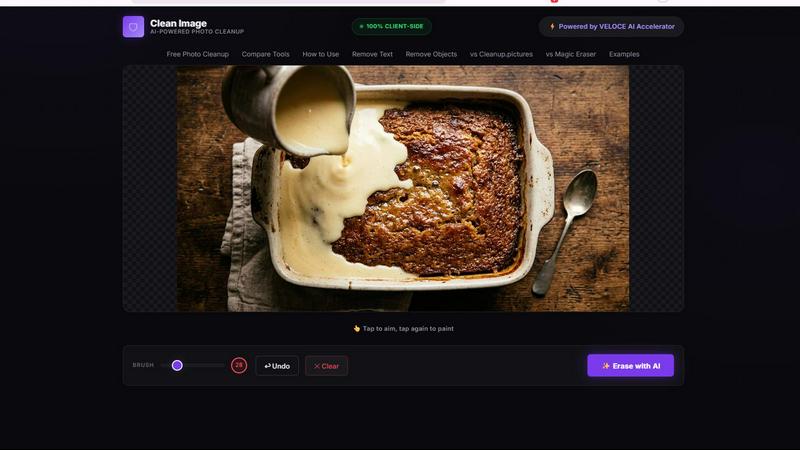
About Clean Image AI-Powered Photo Cleanup
Clean Image AI-Powered Photo Cleanup is a revolutionary, free browser-based tool designed to remove unwanted elements from your photos with the power of artificial intelligence. This product targets common photo imperfections such as text overlays, logos, date stamps, watermarks, and small blemishes, restoring your images to a clean, professional state. Unlike traditional photo editing software that requires complex manual cloning or healing brushes, Clean Image uses an advanced AI inpainting model to intelligently reconstruct the area you want to remove, blending it seamlessly with the surrounding pixels. The core value proposition of Clean Image is its uncompromising commitment to privacy and accessibility. All processing happens 100% client-side, meaning your images never leave your device. There are no uploads to external servers, no need to create an account, and no subscription fees. The tool is powered by the ONNX Runtime and the OpenCV LaMa inpainting model, running locally in your browser via WebAssembly. This technology ensures that even complex AI computations are handled efficiently on your machine. Clean Image is ideal for content creators, social media managers, e-commerce sellers, graphic designers, and anyone who needs to quickly clean up images for personal or commercial projects. The tool is particularly effective on images with clean backgrounds where the unwanted text, logos, or objects are clearly distinguishable. By combining state-of-the-art AI with a simple brush-and-erase interface, Clean Image makes professional-grade photo cleanup accessible to everyone, without compromising on privacy or cost.
Features of Clean Image AI-Powered Photo Cleanup
100% Private and Client-Side Processing
This feature ensures that your images are never uploaded to any external server. All AI computations, powered by ONNX Runtime Web and WebAssembly, are executed directly within your browser. This means your sensitive or proprietary image data remains completely secure on your own device, eliminating any risk of data breaches or unauthorized access. You can use Clean Image with total peace of mind, knowing that your privacy is guaranteed.
AI Inpainting with OpenCV LaMa Neural Network
The core of Clean Image is the advanced OpenCV LaMa inpainting model. When you brush over an area you want to remove, this neural network analyzes the surrounding pixels, textures, and patterns. It then intelligently reconstructs the brushed-over region, filling it with content that matches the background perfectly. This is far more effective than simple cloning or blurring, producing natural-looking results for text, logos, and date stamps.
Instant Performance After First Load
Clean Image is designed for efficiency. The AI model, which is approximately 89 MB, is downloaded and cached in your browser on your first visit. On subsequent visits, the tool loads instantly with zero additional data usage. This means you can perform multiple photo cleanups in rapid succession without waiting for downloads, making the tool exceptionally fast for batch processing or frequent use.
Simple Brush and Erase Interface
The user interface is built for simplicity and speed. You simply load your image, use a brush tool to paint over the unwanted text, logo, object, or blemish, and click the erase button. The AI takes care of the rest. There are no complex layers, masks, or settings to configure. This intuitive workflow makes the tool accessible to beginners while remaining powerful enough for professionals who need a quick, reliable cleanup solution.
Use Cases of Clean Image AI-Powered Photo Cleanup
Removing Watermarks and Logos from Images
Content creators and marketers often need to use stock images or screenshots that contain unwanted branding or watermarks. Clean Image allows you to quickly and cleanly remove these elements, leaving a pristine image suitable for use in presentations, social media posts, or marketing materials. The AI inpainting is particularly effective on logos placed on uniform backgrounds, restoring the original image without visible artifacts.
Cleaning Date Stamps and Timestamps from Photos
Old digital photos often have intrusive date stamps in the corner, which can ruin the aesthetic of a modern print or digital album. Clean Image makes it easy to remove these stamps. Simply brush over the date, and the AI will reconstruct the background, whether it is a solid color, a gradient, or a complex texture like grass or sky. This is perfect for digitizing old family photos or preparing images for professional portfolios.
Erasing Unwanted Text and Overlays from Screenshots
When capturing screenshots for tutorials, documentation, or reports, you may capture UI elements, error messages, or irrelevant text that you want to remove. Clean Image allows you to erase this text cleanly, leaving a clear and focused image. This is invaluable for technical writers, educators, and support teams who need to create clean visual aids without revealing sensitive or distracting information.
Removing Small Blemishes and Unwanted Objects for E-commerce
E-commerce sellers and product photographers can use Clean Image to clean up product photos. This includes removing small dust spots, minor scratches on packaging, or unintended background elements like price tags or barcodes. The tool is best used on clean, well-lit backgrounds, allowing you to present your products in the best possible light without needing expensive retouching software or hiring a graphic designer.
Frequently Asked Questions
Is Clean Image really free to use, and are there any limits?
Yes, Clean Image is completely free to use with no hidden costs. There are no subscriptions, no pay-per-use fees, and no account creation required. You can use it for both personal and commercial projects without any restrictions. The only requirement is a modern web browser that supports WebAssembly, which most current browsers do.
How does the AI ensure my images are private and secure?
Privacy is the core design principle of Clean Image. The tool runs entirely on your local machine using ONNX Runtime Web and WebAssembly. Your image data is processed within the browser's memory and is never transmitted over the internet to any server. This means no one, including the developers of Clean Image, can access your images. Your data stays on your device from start to finish.
What types of images and backgrounds work best with Clean Image?
Clean Image delivers the best results on images with clean, uniform, or simple backgrounds. It excels at removing text, logos, date stamps, and small blemishes that are clearly distinguishable from the background. Complex backgrounds with intricate patterns, textures, or objects that blend into the background may produce less optimal results. For best performance, use high-resolution PNG, JPG, or WebP files.
How does the AI model work, and why does it need an initial download?
The AI model is based on the OpenCV LaMa inpainting neural network. This model has been trained on millions of images to understand how to reconstruct missing areas based on surrounding context. The initial download of approximately 89 MB is required to load this model into your browser. After the first visit, the model is cached locally, so future visits are instant and require no additional data downloads.
Explore more in this category:
Similar to Clean Image AI-Powered Photo Cleanup
FreeCreate
Create AI images from text or reference photos and turn prompts or still images into short videos with FreeCreate. Start free—no account needed.

AIPetGen
AIPetGen turns a photo of your dog, cat, or other pet, or a written description, into a new picture or a short animation.
VidhyaGen
Fast, free, and privacy-first browser tool to convert, crop, resize, and compress images locally without server uploads.

StyleCut
StyleCut is an AI hairstyle changer that lets you preview 70+ haircut ideas on your own photo before visiting the salon.

Presentation Intelligence
AI-native presentation and visual content platform that turns prompts, documents, images, videos, and data into polished, shareable decks.
AnimeWall
Free AI anime wallpaper generator. Create original HD anime wallpapers and avatars from text prompts.


401k Calculator
401k Calculator.info is a free online tool to estimate retirement savings, employer match, and future 401(k) growth for smarter financial planning.